
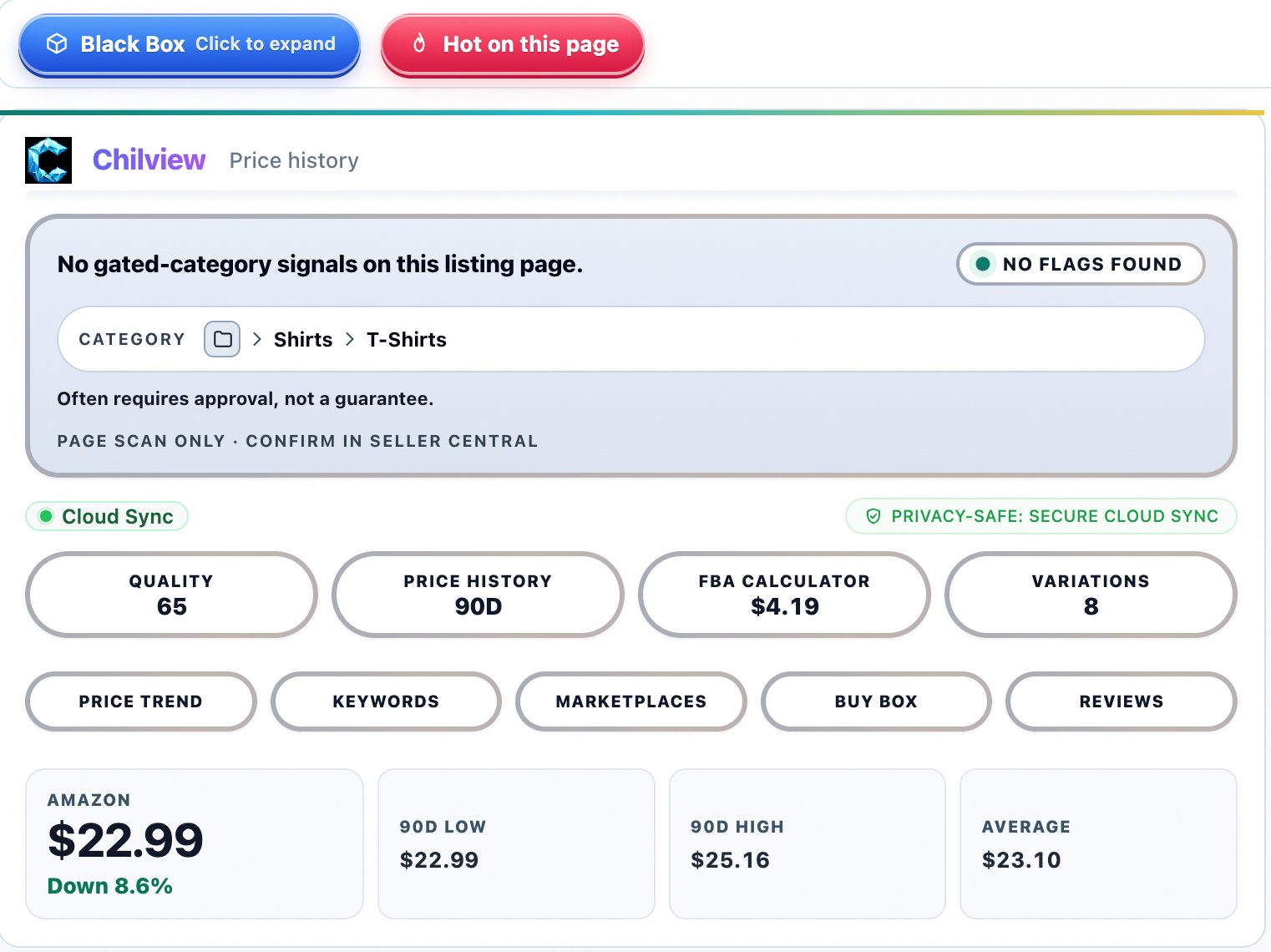
Keepa has been the default price-history tool for Amazon sellers for years, and for good reason: its long price charts changed how Amazon product research works. But the seller-tool market in 2026 looks very different from a few years ago. Many sellers are shopping for a Keepa alternative — sometimes over price, sometimes over workflow, sometimes because they want price history, Buy Box analytics, and an FBA calculator inside one Amazon seller tool instead of bouncing between subscriptions.
If you're comparing options, here's what actually matters: finding a price-history workflow that fits how you research products today.
### 1. How the price history is collected
The single most important question to ask about any Keepa alternative: where does the price data come from? Keepa's strength is a long, recorded archive. Newer Amazon seller tools typically show price history captured from Amazon pages themselves — the current price, recent price movements, and on-page signals.
Chilview's price panel shows what is genuinely observable on the page — up to 90 days of price history — and labels the panel "PAGE SCAN ONLY · CONFIRM IN SELLER CENTRAL" rather than pretending to show data it can't verify. When a tool claims multi-year price archives without a tracked catalog behind it, be skeptical. Real data with visible limits beats impressive-looking invented numbers every time, because invented numbers cost you real money when you order inventory.
### 2. Buy Box ownership data matters more than most sellers think
Price alone doesn't win you sales — the Buy Box does. A serious Keepa alternative should show who actually holds the Buy Box on a product: Amazon itself, a third-party seller, or a rotating cast of both.
This is where observed data gets genuinely useful. In a study of 57,410 Amazon visits, Amazon itself held the Buy Box only 7.2% of the time — third-party sellers held it 92.8% of the time. Buy Box analytics that show ownership patterns — price, seller, and FBA status over time — tell you whether a listing is winnable before you invest a dollar. If your price-history tool doesn't show Buy Box data, you're only seeing half the picture.
### 3. Sales rank (BSR) is a proxy — treat it like one
Every Amazon product research tool shows Best Seller Rank, and BSR really is useful as a demand proxy. But BSR is not sales volume, and any tool that converts BSR into a precise "monthly units sold" figure is estimating, not measuring. Honest tools label estimates as estimates.
The workflow that works: use BSR direction (rising, stable, falling) plus review velocity plus the "bought in past month" signals Amazon itself displays, and combine them into your own judgment. A good Helium 10 alternative or Keepa alternative should make these proxies visible and clearly labeled — not hide the uncertainty behind a confident-looking dashboard.
### 4. Look for the FBA profit calculator built into the workflow
The strongest Amazon seller tools put both in one view so you can move from "interesting price" to "actual margin" without opening a separate tab.
Chilview's product panel includes an FBA profit calculator right next to its price-history view, so you can check fees and margin on the same page you're researching. When evaluating any alternative, run the same product through the tool's calculator and compare it against what you know your fees to be — accuracy on fees is a quick honesty test for the whole tool.
### 5. Check the privacy story and the price
Two practical points sellers often skip. First, privacy: some tools route your browsing through their servers or ask for accounts and logins. Chilview's stated policy is simple — "Chilview collects no personal info — only product information" — and it stays login-free, reading only the public product data (ASIN, price, BSR, Buy Box) on Amazon pages you open. That's the kind of clear privacy line worth looking for.
Second, price: Chilview offers a 3-day full-access trial with no card required, plus 2 extra days if you subscribe to the Seller Brief (5 days total), with one trial per computer. After that, the first 500 Founders get $30 one-time lifetime access; then it's $10/month Pro. Founder access works on 2 devices, and the extension runs on Chrome and Brave. Compare that honestly against what you're paying now — but compare it on verified terms, not marketing claims.
### The bottom line
The best Keepa alternative isn't the one with the longest chart — it's the one that shows you real, verifiable data (price history, Buy Box ownership, BSR direction), labels its estimates honestly, keeps your margin math one click away, and respects your privacy. Judge every option by that bar, including Chilview, and pick the workflow that actually fits how you research.