
# Private Label Sourcing on Amazon: How to Vet Variation Families Before You Order Inventory
Private label sellers usually fail at the variation level, not the product level. You pick a solid niche, find a decent supplier, and plan a good listing — then discover the 4-pack outsells the 2-pack, one color has no featured offer, and the 4,000 reviews on the page are pooled at the parent while your new ASIN starts at zero. Every one of those surprises is a variation-family problem, and variation families are exactly what you can research on-page before you spend a dollar.
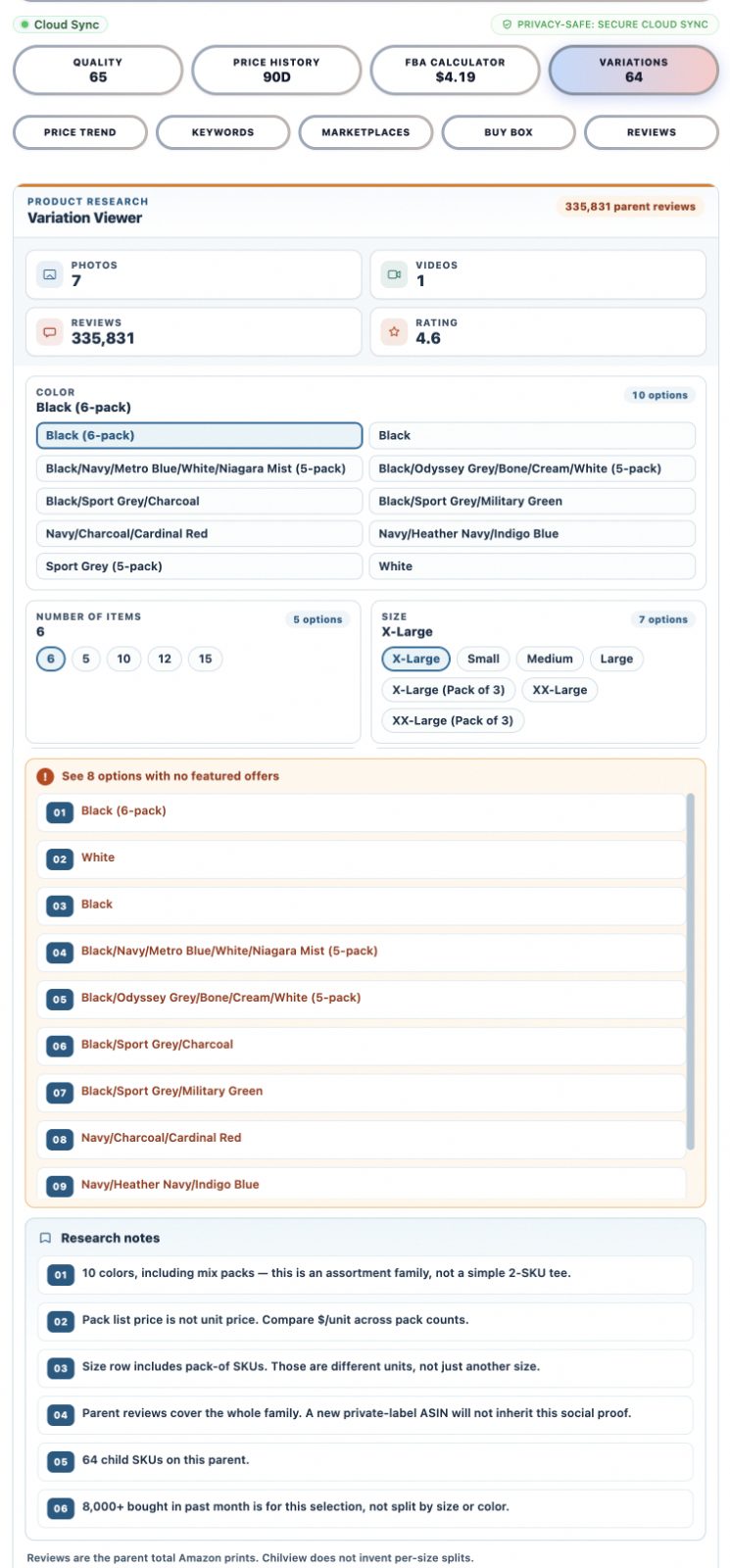
Chilview's Product Research tab includes a Variation Viewer that shows the full variation family for a product — every color, pack count, and size — and flags which options have no featured offer. It also adds honest research notes: parent reviews cover the whole family and are not inherited by a new ASIN, and Chilview does not invent per-size sales splits it cannot see. (Verified on the Chilview extension product research view, October 2026.)
Here is how to use that view in a private label sourcing workflow.
## 1. Map the family before you shortlist a supplier
Open the top listings in your target niche and look at each variation family: which colors, which pack counts, which sizes exist today. Sellers who skip this step order a single SKU and then discover competitors sell four. You are not guessing at demand — you are reading the structure of the market as Amazon displays it right now.
## 2. Flag variations with no featured offer
The Variation Viewer marks options with no featured offer. In private label research that flag is information: an option nobody is actively merchandising may be a gap — or it may be a variant the market rejected. Cross-check it with BSR tracking and review velocity before deciding which side of that bet you are on.
## 3. Read parent reviews honestly
A listing with 4,000 reviews looks intimidating until you learn the reviews are pooled at the parent across 12 variants. Your new ASIN will launch with zero of them. Chilview's honest-data approach matters here: parent reviews cover the whole family and do not transfer to a new ASIN, and the tool does not invent per-variant splits to flatter the data. Plan your review strategy around the real starting number: zero.
## 4. Use pack-count data to price your entry
Pack count is where private label margins hide. A 1-pack at one price and a 4-pack at a lower per-unit price tell you the market's price ceiling and floor. Run both through an FBA profit calculator with real fees before you commit — Chilview's price history and BSR tracking keep the inputs honest instead of optimistic.
## 5. Study how the Buy Box behaves near your niche
Chilview's Buy Box study (57,410 visit-weighted captures, published October 2026) found Amazon holds the Buy Box only 7.2% of the time — third-party sellers hold it 92.8%. In private label you own your listing, so you are not fighting for the Buy Box the way resellers do. But the study still instructs: in the wholesale and gateway niches adjacent to your private label space, knowing how the Buy Box behaves tells you whether your pricing strategy needs to be defensive or can stay premium.
## 6. Compare across marketplaces before you source
Chilview supports cross-marketplace comparison — compare the same product across Amazon regions before you place an order. A variation family that looks saturated in the US may be thin in another region, and that can change what your supplier's MOQ is worth to you.
## Why variation-first research works
Most Amazon seller tools show you a single ASIN. Private label is not a single-ASIN business — it is a family business. The family determines your SKU count, your inventory split, your review starting line, and your pricing architecture. Seeing all of that on-page, before the purchase order, is the difference between a researched bet and a guess.
## Getting started with Chilview
Chilview is a paid Amazon product research extension with a 3-day full-access trial — no card required. Subscribe to the Seller Brief and get 2 extra days (5 days total; one trial per computer). The first 500 Founders get lifetime access for a one-time $30; after that it is $10/month Pro. Founder works on 2 devices, on Chrome and Brave. And the privacy line the company stands behind: "Chilview collects no personal info — only product information."
END OF POST BODY