
Why Some Amazon Sellers Are Looking for a Helium 10 Alternative in 2026
If you sell on Amazon, you already know Helium 10. It's been the default Amazon seller tool suite for years. But lately, more sellers are asking a quieter question: do I actually need a heavyweight suite to do solid product research — or is there a lighter, cheaper way that shows me honest data without the monthly subscription?
That's the conversation this post enters. Here is an honest look at what a Helium 10 alternative can and can't do for you, and how to decide whether a lighter tool like the Chilview extension fits your workflow.
What Sellers Actually Use Helium 10 For
Most sellers don't touch every tool in a big suite. The daily work usually comes down to a short list:
1. Checking price history before committing to inventory
2. Estimating whether a niche is too competitive to enter
3. Reading BSR and review velocity to sense demand
4. Running quick profit math on fees and shipping
5. Finding keyword ideas and listing gaps
If your actual usage lives in those five tasks, a full-suite subscription may be overkill. That's where a focused Amazon product research tool comes in.
What a Good Helium 10 Alternative Should Give You
Not every alternative is built the same. Before you switch anything, run your candidate through these checks:
1. Price history you can actually read. A 90-day price chart tells you whether "today's price" is a deal or a trap. The Chilview extension shows a 90-day price history panel right on the Amazon product page, with plain honest labels about what the scan covers — including an explicit "PAGE SCAN ONLY · CONFIRM IN SELLER CENTRAL" note so you never mistake a page scan for full marketplace data.
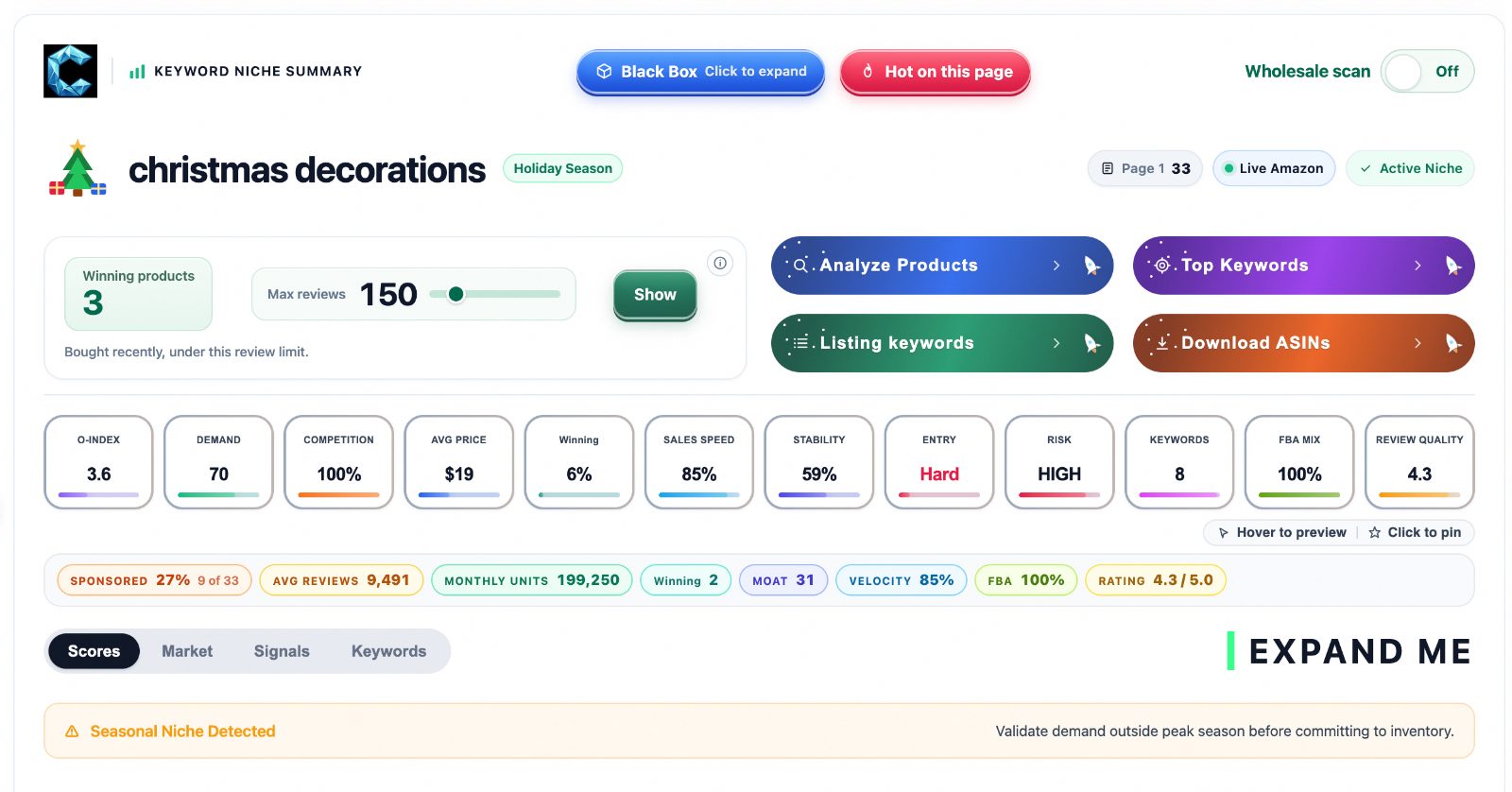
2. Niche demand signals without invented numbers. The honest approach shows observed proxies — things like "bought in past month" counts, BSR, and review velocity — and labels them as estimates. Chilview's keyword niche summary, for example, shows demand and entry-difficulty indicators plus a plain risk warning (for instance, flagging a keyword as a seasonal niche when the data says so) rather than inventing monthly sales figures that no on-page source can verify.
3. A real FBA profit calculator on the page. You shouldn't need a second tab open to do fee math. Chilview puts an FBA profit calculator directly in the price-history panel, so cost, fees, and margin sit next to the numbers they're computed from.
4. Buy Box visibility. Chilview's published Buy Box study — 57,410 visit-weighted captures across Amazon — found Amazon itself wins the Buy Box in 7.2% of US visits while third-party sellers take 92.8%. Knowing how Buy Box ownership actually splits in your category changes how you price.
5. No-login simplicity. Chilview stays login-free by design: it reads public on-page Amazon text only (ASIN, price, BSR, Buy Box), and the company line is verifiable — "Chilview collects no personal info — only product information." No Seller Central connection, no account linking, no personal data changing hands.
The Real Differences: Suite vs. Focused Tool
The honest comparison cuts both ways:
- Suites bundle dozens of tools. If your team genuinely uses keyword trackers, PPC managers, listing builders, and multi-market dashboards every day, a focused extension isn't a replacement for that stack.
- But if your daily reality is page-level research — vetting products, checking prices, sizing up niches — the extension model wins on speed. Nothing to log into, nothing syncing in the background, and the data appears where you're already browsing: the Amazon product page.
Also worth noting: Chilview ships features suites often bury in premium tiers. Black Box-style product discovery, a wholesale scan toggle, and Niche Hunt are live in the extension today, alongside the keyword and niche scoring panels.
The Money Question
Here's where the alternative argument gets concrete. Suite tools charge monthly subscriptions that add up fast over a year. Chilview's offer is deliberately different:
- 3-day full-access trial, no credit card required
- 2 extra days when you subscribe to the Seller Brief email (5 days total)
- One trial per computer — no gaming the system, which keeps the pricing honest for everyone
- First 500 Founders get lifetime access for a one-time $30, good on 2 devices
- After the Founder seats fill, Pro is $10/month on getchilview.com via Stripe
- Works on Chrome and Brave
Nobody should call this a "free" tool — it isn't. It's a paid tool with a genuinely full trial and a one-time Founder option that undercuts a year of suite subscriptions by a wide margin.
How to Try the Alternative Without Risk
The low-friction path: install the Chilview extension from the Chrome Web Store, run the full 3-day trial on your real research workflow, and add the Seller Brief subscription for 2 more days if you're still evaluating. Keep your existing suite active in parallel for one week, then compare — same products, same decisions, same week. If the extension covers your daily five tasks, you'll feel the difference in your workflow immediately; if it doesn't, the trial cost you nothing but a few days of testing.
Cross-Marketplace Comparison: A Note for Global Sellers
One capability worth verifying in any alternative: cross-marketplace comparison. Chilview does compare the same product across Amazon regions before you source — useful if you buy in one region and sell in another. Verify it's there in the trial rather than taking anyone's word for it.
The Bottom Line
A Helium 10 alternative isn't about hating Helium 10. It's about matching the tool to the job. If your job is daily page-level product research — price checks, niche reads, profit math, Buy Box awareness — a focused, honest, page-native extension like Chilview can cover it for a fraction of a suite's ongoing cost, with no login and no inflated numbers. If you live in PPC dashboards and listing builders, keep the suite.
The best tool is the one that shows you real data, tells you what it can't show, and gets out of your way. Test that against your own workflow for five days, and let the results decide.