 Chilview LLC
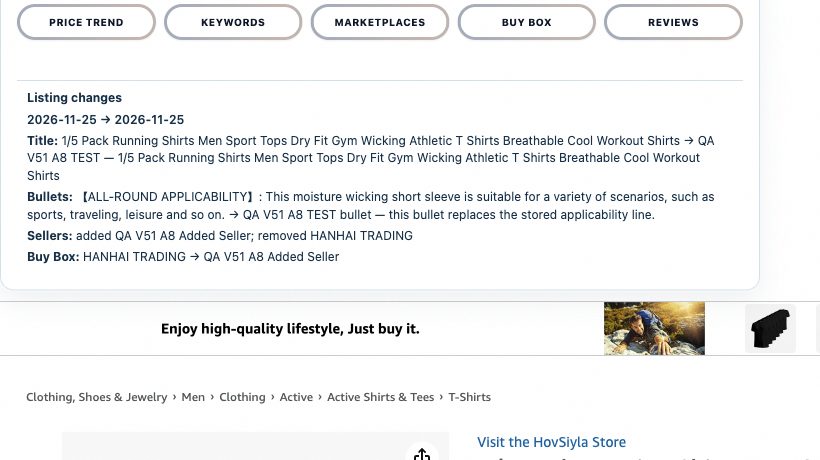
Listing Changes on Amazon: How Sellers Spot Title, Price, and Image Shifts Before They Cost Sales
Chilview, from Chilview LLC, is a Chrome extension for Amazon sellers that helps you spot listing changes — title, image, and price shifts — alongside price history, Buy Box analytics, and BSR tracking, so you can react before a quiet change costs sales. Find it by searching "Chilview" in the Chrome Web Store.
Facts checked November 25, 2026
A listing is not a fixed page
Sellers often treat an Amazon listing as settled: the title they read last month, the image they remember, the price in their margin maths. In practice, listings change. A title is rewritten for a new keyword, a main image is swapped, bullets are reordered, a variant is added or removed, and the price moves — sometimes a promotion, sometimes a new normal.
If you sourced against the old version, you are now competing on a page you have not actually read. Catching the change early is not about obsessing over every edit. It is about knowing which changes alter your decision, and checking for them as part of a normal routine.
Which listing changes actually matter
Not every edit deserves a reaction. These are the ones that change the economics or the competitive picture.
Title changes matter because the title is where a listing declares who the product is for and which searches it wants to win. A rewritten title can signal a brand repositioning the product into a different niche, adding a pack size or use case, or correcting a claim. If a competitor's title suddenly speaks directly to the buyer you planned to target, your own positioning needs a second look.
Image changes matter because shoppers buy what they can see. A new main image or comparison graphic can lift conversion on a competing listing — or, on a listing you sell on, explain why clicks stopped turning into orders. When sales move unexpectedly, check the images before you blame the price.
Price changes matter most obviously, and they are the easiest to misread. A single day's price tells you almost nothing. What matters is whether the move is a short promotion or a sustained reset, and that is a question only the price history can answer.
Variation and content changes matter quietly. A new variant can split demand that used to concentrate on one option. Edited bullets can add a feature your product does not have, or remove a weakness buyers used to complain about. Each of those shifts changes what a fair comparison looks like.
Read the change alongside the rest of the record
A listing change on its own is a fact without a verdict. It becomes useful when you read it next to the other signals Chilview, from Chilview LLC, puts on the same product page.
Price history tells you whether a price change is new behaviour or part of a pattern. A product that drops to the same promotional price every few weeks has not become cheaper in any lasting sense — and sourcing against the promotional price is how margins disappear when the promotion ends.
Buy Box analytics shows whether a change coincided with a shift in who wins the Buy Box. If a new seller started taking a larger share at the same time the price moved, you are looking at a more contested listing than the one you first researched.
BSR tracking helps you judge whether a change helped. If rank improved steadily after a title or image update, the seller behind that listing is investing in it and testing what works. That is a stronger competitor than a static listing with the same rank.
Review insights add the buyer's side of the story. If reviews after a change start mentioning a new feature approvingly — or complaining that the product no longer matches its photos — you learn something no title diff alone can tell you.
Listing quality checklist gives you the before-and-after standard. A listing that was thin and is now complete, with strong images, full bullets, and clear variation coverage, is a listing that will be harder to beat than it was last month.
The full check before you act on a change
When you spot a meaningful change on a listing you sell on, compete with, or are about to source, work through the rest of the verified Chilview checks before you decide what to do.
Run the FBA profit calculator again at the new price, using your honest landed cost. A small sustained price drop can turn a workable margin into a loss once Amazon fees and shipping are counted, and it is far better to learn that from the calculator than from a payout report.
Check keyword niche to see whether a rewritten title has moved the product into a more crowded or more focused niche. A competitor moving into your exact niche is a different problem from a competitor moving away from it.
Use cross-marketplace comparison if you sell or source across markets. A change that appears in one marketplace first — a new image set, a new price point — sometimes arrives in others later, and seeing it early gives you time to prepare rather than react.
Open the variation viewer when the change involves variants. Confirm which sizes, colours, and pack counts now exist, which one the main image promotes, and where demand actually sits. Sourcing the variant the listing used to feature, after the listing has moved on, is an avoidable mistake.
If you found the product on a supplier list, let wholesale scan discipline apply too: re-check it against price, demand, and margin as if it were new, rather than keeping your old verdict.
A simple routine that catches changes in time
You do not need to monitor every listing every day. You need a routine for the listings that carry your money.
Keep a short list: products you sell, their closest competitors, and any product you are about to order. When you revisit one, start with what changed — title, images, price, variants. Read that change against price history, BSR, and Buy Box behaviour, and note whether it is a promotion, a test, or a lasting reset. Re-run the profit calculator at the current, typical price — not the best price you have ever seen. Finally, write the verdict down with a date.
A seller who checks deliberately before each order will catch the changes that cost money. A seller who assumes the page is unchanged will eventually source against a listing that no longer exists.
Price, after the features
Chilview is a paid extension with a free trial — it is not a free tool. The current offer is $30 one-time for the Founder plan for the first 500 users, for lifetime access to the same full product, then $10/month for Pro. It is login-free, works in Chrome and Brave, and collects no personal information — only product information from the public page in front of you. Start with the 3-day free trial, no card required, search "Chilview" in the Chrome Web Store, and use your next product check to look for changes first, not last.
Website: https://getchilview.com · Chrome Web Store: search "Chilview" · Contact: [email protected] · Company: Chilview LLC