 Chilview LLC
Online Arbitrage Research Workflow for Q4: How Amazon Sellers Check a Deal Before They Buy
Chilview from Chilview LLC is a lightweight Amazon product research extension for Chrome and Brave that helps online arbitrage sellers check price history, Buy Box analytics, BSR tracking, review insights, and FBA profit in one place, on the product page itself. Search Chilview in the Chrome Web Store to start a 3-day free trial, no card required.
Facts checked November 13, 2026
A discount is not a deal until the Amazon side checks out
Online arbitrage looks simple: find a product discounted at a retailer, list it on Amazon, keep the difference. The failures happen in the gap between those steps. A clearance price means nothing if the Amazon price is falling, if a dozen sellers are about to land on the same listing, or if fees and shipping quietly erase the spread.
In Q4 that gap gets wider and faster. Retail discounts deepen, Amazon prices move daily, and every other arbitrage seller is scanning the same deals. A repeatable workflow — same steps, same order, every candidate — separates a good buy from inventory you are still discounting in January.
Step 1: Start with price history, not the sale tag
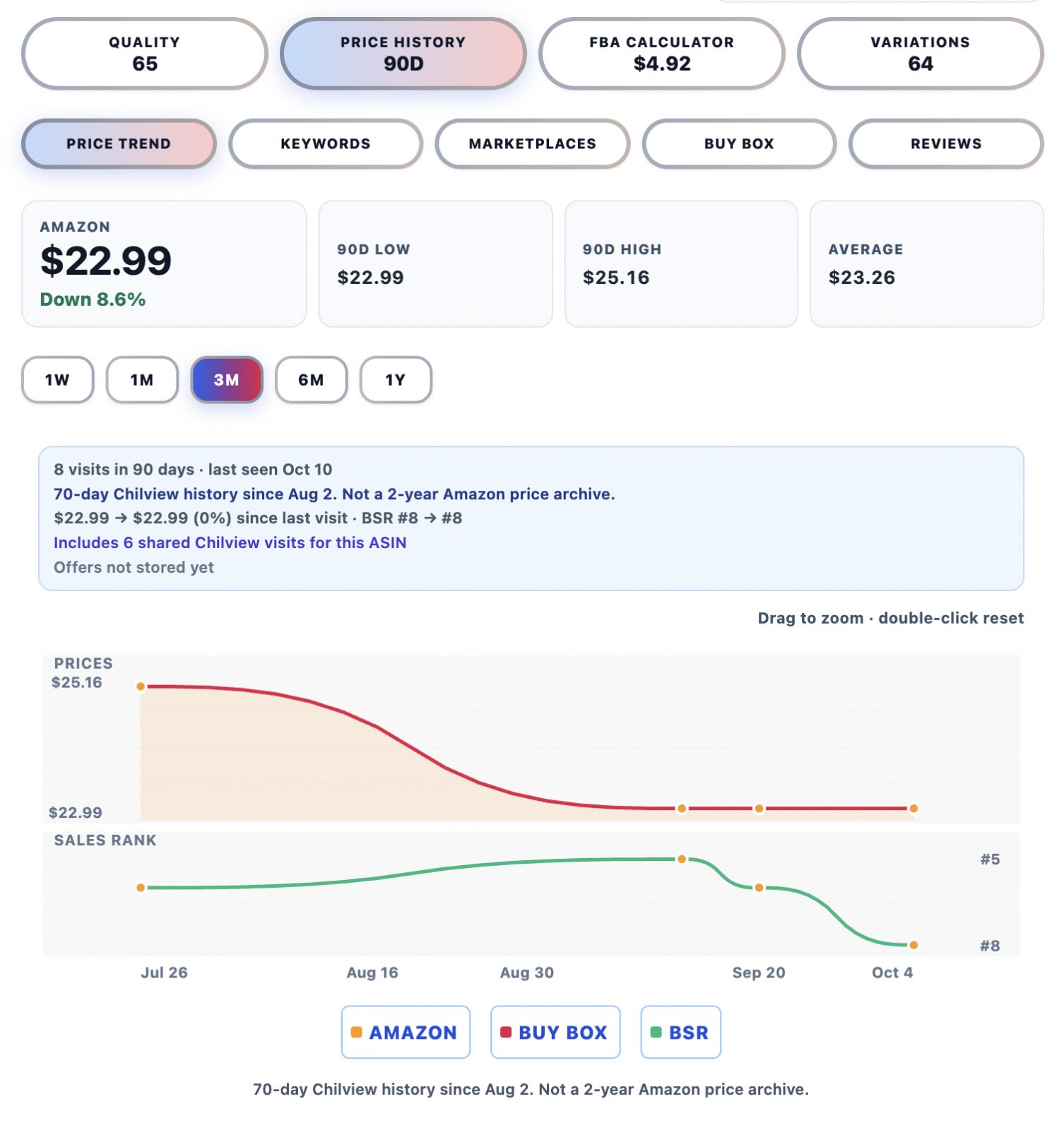
The retailer's discount percentage is marketing. What matters is the Amazon price over time. Open the Amazon listing and check price history first: is the current Amazon price normal for this product, or is it a temporary peak that will fall back before your shipment even arrives at a warehouse?
A deal built on a price spike is not a deal. Look for a stable Amazon price band across recent weeks, then test your margin against the lower end of that band, not today's highest point. If the product only works at its peak price, pass.
Step 2: Check BSR tracking for real, repeatable demand
Next, check BSR tracking. Best Sellers Rank is a rough, honest signal of how consistently a product sells in its category — not a sales guarantee, and Chilview treats it that way. For online arbitrage, consistency matters more than a single good day: a product that spiked once during a promotion and then went flat is a very different buy from one that holds a steady rank range week after week.
Q4 lifts almost everything, so judge rank against the product's own history, not the holiday surge alone. Demand that only exists in December disappears in January.
Step 3: Read the Buy Box before you join it
Buy Box analytics show how competition actually behaves on the listing. Does one seller hold the Buy Box steadily, or does it rotate among many sellers at aggressive prices? Is Amazon itself on the listing, and are sellers' prices clustered tightly or spread out?
This step predicts your real selling price. If sellers are already competing the price down toward your break-even point, the retail discount is an illusion — by the time your units are live, the spread will be gone.
Step 4: Use review insights and the listing quality checklist to spot trouble early
Before you buy units you cannot easily return, read what buyers already say. Review insights surface patterns in buyer feedback: benefits praised again and again, and complaints that repeat. A repeating defect complaint is a return wave waiting to happen — and returns hit arbitrage margins hard, because you have no supplier relationship to fall back on.
Then run the listing quality checklist. Does the listing explain dimensions, compatibility, and what is in the box clearly? Unclear listings produce disappointed buyers and returns even for genuine products.
Step 5: Check the exact variation, and look across marketplaces
Use the variation viewer instead of clicking through variants one by one. Arbitrage deals often apply to one variation only — one size, colour, or pack count on clearance — while the Amazon data you are reading belongs to another. Confirm the discounted variation is the one with the demand, the stable price, and the clean review pattern, not a sibling variant that happens to share the page.
If you sell beyond one Amazon marketplace, run a cross-marketplace comparison as well. The same product can be crowded in one market and comparatively open in another, and a clearance find that fails in one market sometimes works in the other.
Step 6: Let the keyword niche confirm the buyer
Keyword niche research answers a quieter question: is there a focused group of buyers searching for this product in clear language? A product with a coherent niche — searches describing the same buyer and use case — tends to keep selling after the holiday noise fades. A product nobody searches for, which only moves when promoted, is a riskier buy, however deep the discount.
Step 7: Run the FBA profit calculator last — with honest inputs
Only now should price decide. Use the FBA profit calculator with your real numbers: the actual retail price you will pay including tax, shipping to you or to Amazon, and a selling price taken from the stable band in the price history — not the Q4 peak. Then stress-test it: what happens if the Amazon price drops a little under competition, or if a few units come back as returns?
If the deal only survives at the best-case price with zero returns, it does not survive. The calculator's job in arbitrage is not to confirm the deals you like; it is to kill the ones that were never deals at all, before your money is in boxes.
Where wholesale fits the same workflow
Many arbitrage sellers add wholesale accounts over time, and the discipline does not change. A wholesale scan applies the same steps — price history, BSR tracking, Buy Box analytics, review insights, FBA profit calculator, keyword niche, listing quality checklist, cross-marketplace comparison, and variation viewer — across a supplier list instead of a single retail find. That is the full verified Chilview workflow.
Honest data, by design
Chilview is a paid extension with a free trial — it is not a free tool. It works in Chrome and Brave, it is login-free, and it collects no personal information, only product information shown on the page. It works only from public, on-page Amazon text, does not ask for Seller Central access, and does not invent numbers. Where backend data is not publicly obtainable — backend search terms, competitor click data, or per-ASIN return rates — it does not pretend otherwise. It shows observed, on-page signals and labels estimates as estimates.
That honesty matters most in arbitrage, where a deal decision takes minutes and the money is real. The prices, ranks, and reviews you can see are real observations. Whether a buy makes money is still your judgement — this workflow makes sure you make it with competition, demand, and margin checked first, not after.
Try it on your next deal
Chilview costs $30 one-time for the Founder plan for the first 500 users, then $10/month for Pro. Every new user starts with a 3-day free trial, no card required, so you can run this workflow on real Q4 deals from your own shortlist before you pay anything. Search "Chilview" in the Chrome Web Store, open the next discounted product you are considering, and check the Amazon side properly before you buy.
Website: https://getchilview.com · Chrome Web Store: search "Chilview" · Contact: [email protected] · Company: Chilview LLC