 Chilview LLC
Chilview is a lightweight Amazon product research extension from Chilview LLC that helps sellers check price history, Buy Box analytics, BSR tracking, and every listing variation directly on the Amazon product page. Sellers install it by searching "Chilview" in the Chrome Web Store and start with a 3-day free trial, no card required.
Facts checked November 7, 2026
## Why variations are where good research goes wrong
A parent listing can look strong while most of its child variations are weak. One size sells, another sits. One color holds its price, another is in a race to the bottom. One bundle wins the Buy Box consistently, another is shared by a dozen sellers with no stable margin.
If you judge the parent listing as a single product, you miss all of that. You might source the slow variant, price against the wrong competitor set, or estimate demand from reviews that belong to a different size or style. This gets more expensive in Q4 when inventory decisions move fast.
The fix is simple: check every variant before you source, not after stock arrives.
## What the Chilview variation viewer shows you
Chilview is a paid extension with a free trial — it is not a free tool. It works in Chrome and Brave, it is login-free, and it collects no personal information, only product information shown on the page. You open an Amazon product page and Chilview works from the public, on-page data in front of you.
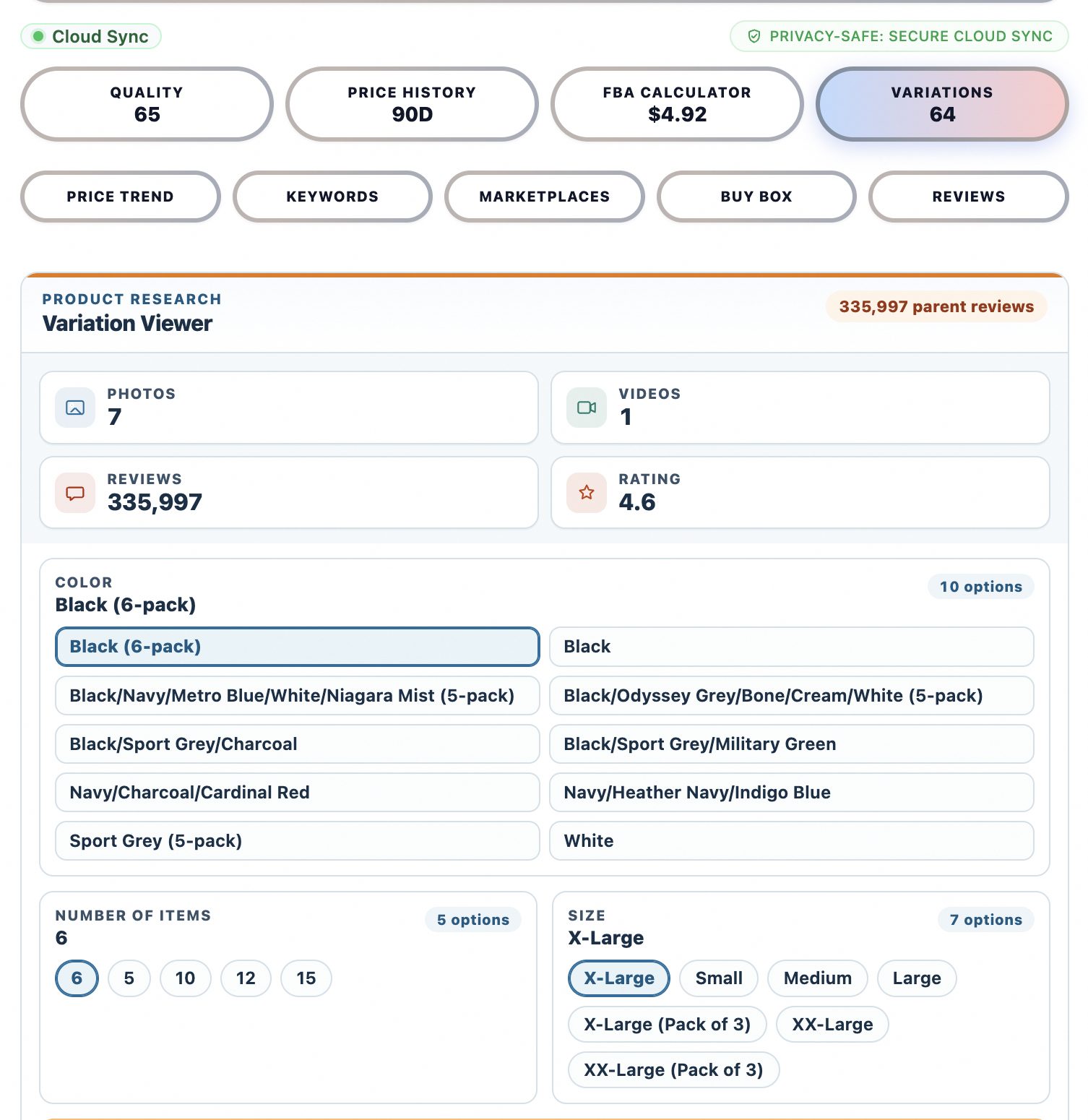
The variation viewer lays out the listing's variations in one place so you can compare them side by side instead of clicking through each child ASIN one at a time. You can see whether price, availability, and competition are the same across the family or completely different from one variant to the next.
That changes the research question from "is this product good?" to "which variant, if any, is worth sourcing?"
## A step-by-step variation workflow
### 1. Start with the variation map, not the headline metrics
Open the product page and open the variation viewer first. Note how many variations exist, what drives them — size, color, count, style, or bundle — and whether the listing mixes genuinely different products under one parent. Listings that combine unrelated items under one parent can inflate review counts and confuse demand signals, so flag those early.
### 2. Check price history for the variants you would actually buy
Switch to the variants you would realistically source and check their price history. Chilview shows price history directly on the page, so you can see whether the current price is normal, temporarily discounted, or unusually high. A variant that only looks profitable at a short-lived peak price is not a good buy. A variant with a stable price band over time is a safer sourcing candidate.
### 3. Compare BSR and review signals per variant
Use BSR tracking to understand how the listing ranks in its category, then use review insights to read what buyers actually say about the specific variant. Reviews often call out variant-specific problems — sizing that runs small, a scent people dislike, a pack size that feels poor value. Those details rarely appear in the parent-level summary, but they decide returns and repeat purchases.
### 4. Check Buy Box behaviour before you trust the margin
Buy Box analytics show how competition behaves on the listing. If the Buy Box rotates constantly among many sellers at falling prices, your expected margin may not survive contact with reality. If one seller holds the Buy Box at a stable price, the listing is easier to plan around. Check this per listing, and pay extra attention to the variants with the most sellers competing for them.
### 5. Run the numbers in the FBA profit calculator
For each shortlisted variant, run your landed cost, shipping, and Amazon fees through the FBA profit calculator. Do this per variant, not once for the parent, because pack counts and dimensions can differ between variants and change the fee picture. A larger variant might sell for more but cost disproportionately more to ship and store.
### 6. Validate demand beyond the listing itself
Finish with the rest of the Chilview toolkit before you commit:
- **Keyword niche** — check whether shoppers search for this type of product in a focused niche or a crowded generic market.
- **Listing quality checklist** — see whether the listing itself is well built, which affects how much of its demand you can realistically share or compete with.
- **Cross-marketplace comparison** — compare the same product across Amazon marketplaces to spot price and demand differences.
- **Wholesale scan** — if you source wholesale, scan for other listings and variations you may have missed in the same product family.
- **Price history, Buy Box analytics, BSR tracking, review insights, FBA profit calculator, and the variation viewer** — together, these cover the full check: price, competition, rank, buyer sentiment, profit, and variant structure.
That is the full verified Chilview feature set, and the variation check is stronger when you use it as part of the whole workflow rather than on its own.
## Honest data, by design
Chilview stays login-free and works only from public, on-page Amazon text. It does not ask for Seller Central access and it does not invent numbers. Where exact backend data is not publicly available — such as a seller's backend search terms or per-ASIN return rates — Chilview does not pretend otherwise. It shows observed, on-page signals such as price history, BSR movement, and review patterns, and labels estimates as estimates.
For variation research, that honesty matters. The data you need most — which variants exist, how they are priced, who competes for the Buy Box, and what buyers say — is on the page, organised in one view instead of twenty clicks.
## A short pre-source checklist for Q4
Before you place an order this holiday season, run through this list:
1. Have I viewed every variant, not just the default one Amazon showed me?
2. Is the price I am planning around stable in the price history, or a temporary peak?
3. Does the Buy Box behaviour leave room for my margin at a realistic price?
4. Did the FBA profit calculator confirm profit for this specific variant, including its size and weight?
5. Do the reviews for this variant mention problems that could drive returns?
6. Is there a keyword niche here, or am I entering a generic, crowded term?
If a variant fails two or more checks, skip it — even if the parent looks excellent. Sourcing the right variant is often the difference between stock that turns over in December and stock discounted in January.
## Try it on your next product
Chilview costs $30 one-time for the Founder plan for the first 500 users, then $10/month for Pro. Every new user starts with a 3-day free trial, no card required, so you can run this variation workflow on your own shortlist before you pay anything. Search "Chilview" in the Chrome Web Store, open a listing with variations you are considering, and check every variant before you source.
Website: https://getchilview.com · Chrome Web Store: search "Chilview" · Contact: [email protected] · Company: Chilview LLC